

Automation Using Neural Agent AI
Neural Agent for automation, prompt-driven workflows, and AI-assisted testing.
What Is Neural Agent?
Neural Agent is a Desktop AI Application which can study your desktop screen and access your mouse, Keyboard and applications to perform multi step workflows. It has a chat window where you can give text or voice commands to perform any tasks across desktop programs and web browsers.
It works by giving simple ‘English’ Language prompts and can be used to execute the test scenarios as required. It can switch between multiple applications and web browsers by taking control of your desktop screen.
Application User Interface and Experience
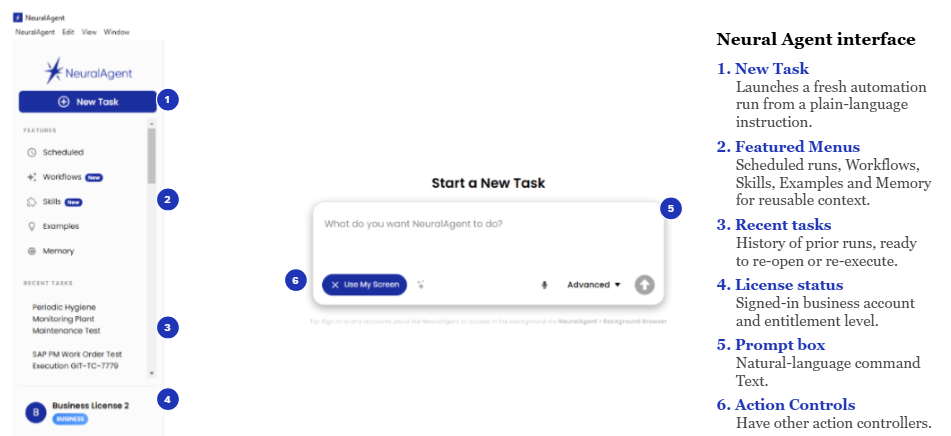
Main opening screen
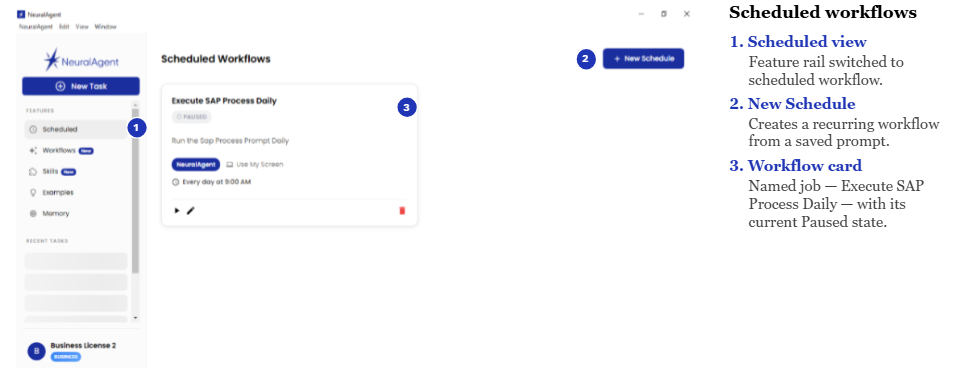
Scheduler Window
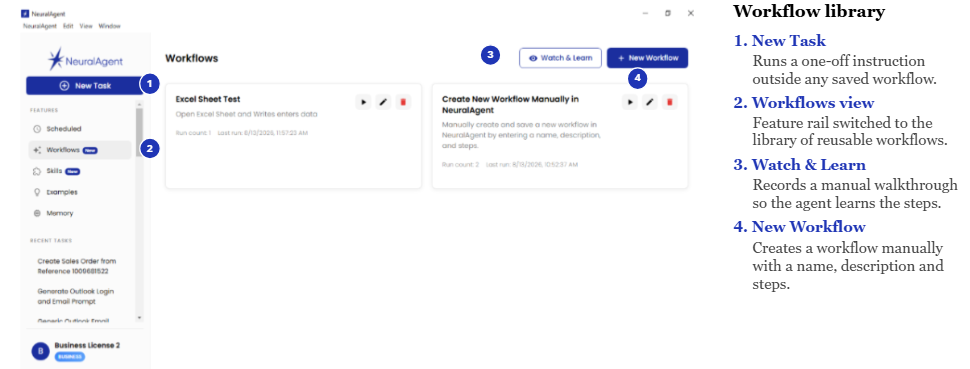
Workflow Menu window
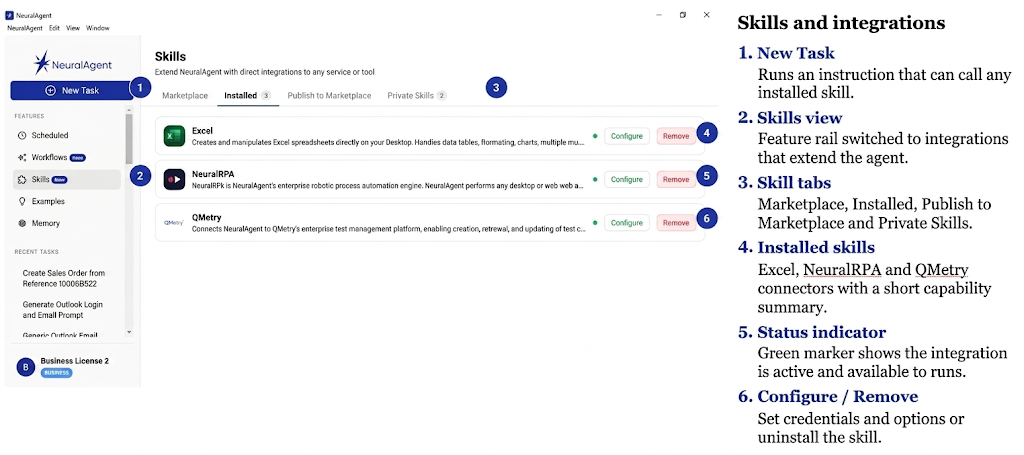
Skills Window
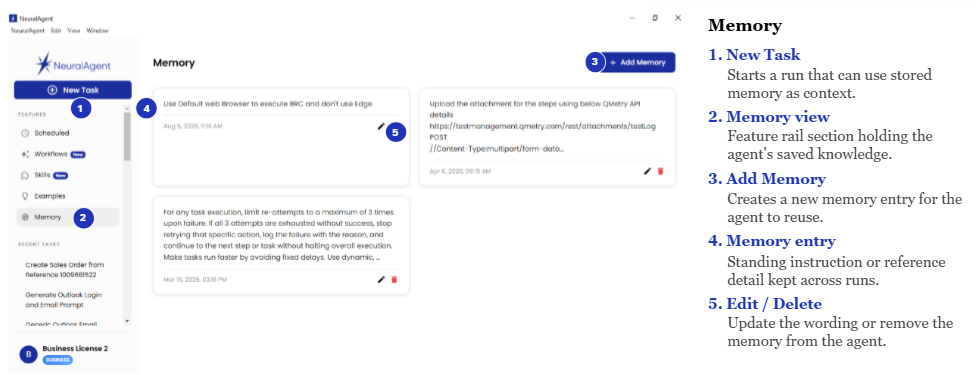
Memory Window
Working with Neural Agent
- Main opening screen: We can write simple English commands, and these commands can be reused as well.
- Scheduler Window: Workflows or Tasks can also be scheduled in its schedular.
- Workflow Menu window: Workflows can be created and saved. It can be reused when required.
- Skills Window: We can save a workflow as private skills so we can reuse it whenever required. Also, we can configure different MCPs in Skills Window.
- Memory Window: It has a memory space where we can give predefined Instruction, and it will consider every time it executes a command. We can instruct it to capture a screenshot and use it later to create a report if we want. The Report can be customized based on just the command. No prior Template definition required.
Example of Prompts for Different automation scenarios
- Use Case: Writing an Email
Test Case: Login to Outlook and write an email.
Step 1: Launch Google Chrome.
Step 2: Log in to Outlook using my credentials and compose a new email. Address the email to [Recipient’s Email Address], use the subject [Subject Line], and include the following in the body:
• A professional greeting
• The main message: [Your Message Here]
• A polite closing and my name/signature
• Once the email is composed, [send it / save it as a draft].
Step 3: Log out and close the browser.
Tip: Replace the values in brackets with your own recipient, subject, message, file path, username, or password as needed.
- Use Case: Creating Bulk Sales Orders from Excel
Step1: Launch SAP Logon app. Search and Login to E3Q. Maximize the screen.
Enter the required data from Below:
[USERNAME]
[PASSWORD]
Step 2: Create SAP Sales Orders using the Excel file at: [File Path].
Step 3: Navigate to VA01, populate all organizational data, header fields (Sold-To, Ship-To, PO Number, Sales Office), and line items (Material, Quantity, Plant). Click Display Header details > Order Data tab > enter Purchase Order Type. Capture Screenshot.
Step 4: Handle all SAP navigation, warnings, incomplete document prompts, and confirmations automatically. Save the order and capture the Sales Order Number. Capture Screenshot.
Step 5: Write the Sales Order Number back to the Excel file (last column) for all rows in the group, then save the file.
Step 6: Once all the rows are complete within excel, Log Off SAP Application.
AI Agent Automation vs. Traditional Automation Tools
| Advantages | ||
| Aspect | Traditional Automation Tool | Neural Agent AI Automation Tool |
| Locators | Traditional Tool uses hardcoded explicit Locators. Hence any changes in the Xpaths or Locators effect the test script directly. E.g.- For a Logon Button if any of the attribute change the button will fail(<findby><n>caption</n><v criteria=”contains”>Logon</v><n>title</n><v criteria=”contains”>Logon</v></findby>) | The AI tools used for automation works on Computer vision and adaptive LLM decision making. Eg- It identify “Login Button” conceptually or through visual semantics. |
| Test Case Maintenance | In Traditional tool Test case can break even with minor UI or Locator changes and requires high maintenance on manual fixes. | AI tool has self-healing and auto adaptive logic to identify objects based on visual. |
| Test Case Creation | While creating test cases using a traditional tool, it requires manual coding or knowledge of coding (e.g. Loops, exception handling). Also, it requires manual creation of test steps from a text or video requirement. | The AI tool uses Natural Language prompts or User stories. Non-technical resources or manual testers can create complex test scenarios easily. It can create test cases from Jira tasks as well as other test management tools (e.g. Qmetry) |
| Exploratory & Usability Testing | In traditional tools, the test case steps are rigid and static. | In AI tool, it will use its knowledge to handle any ad hoc pop ups or warnings or visual layout changes without predefined test cases. |
| Test Script Management | Managing a Test script which is created long ago requires a good amount of manual work, with the change of locators as well as anu UI changes. | In AI based tool, up to 80% reduction in overhead management. |
| Disadvantages | ||
| Aspect | Traditional Automation Tool | Neural Agent AI Automation Tool |
| Execution Speed | Works Ultra-fast(milliseconds) | Slower compared to any RPA or automation tool. Takes time in decision making and applying its own reasoning for every step. |
| Debugging | Very easy and straight forward. As the exact step or line number is indicated. | Complex as Tracing the reasoning is difficult. It keeps on trying different aspects to pass a step. Do not fail the step unless it is an absolute blocker. |
| Consistency | 100% deterministic. As it will fail the test case in case of any minor discrepancy. It’s a simple, 0 or 1 situation. | It’s probabilistic as many at times it will change its reasoning path and can introduce unexpected variation in workflow |
| Verification | Straightforward workflow mapping hence very easy to verify process status or flow. | Requires continuous evaluation and guardrails to prevent errors and deviation. |
Conclusion
Neural Agent represents a shift from rule-based automation to intent-driven automation. Instead of relying only on predefined scripts, it can interpret natural language prompts, understand visual changes, and adapt to dynamic application behaviour. While traditional tools remain valuable for speed, consistency, and deterministic execution, AI agents can reduce maintenance effort, support non-technical users, and make automation more flexible across changing desktop and web environments.
As AI agents continue to evolve, they are likely to become an important companion for QA teams, business users, and automation engineers. The best approach may not be replacing traditional automation entirely but combining both methods: using scripted tools where precision and repeatability are critical, and AI agents where flexibility, adaptability, and faster task creation are needed.