

In automation testing one thing we often have to deal with is test maintenance. A test script may work today but after an application update, it may suddenly fail. This does not always mean there is a problem with the application. Sometimes, a few properties of the object might have changed.
This is where self-healing automation can help.
Self-healing is the method through which the automation tool tries to identify an object even when the object’s technical properties have been changed; i.e. when the automation tool cannot find an object in the same way as before, it tries to find the correct object using other information. If the match is good enough, the test continues instead of failing immediately.
In this blog, we will explore how self-healing works across two popular automation tools: Worksoft Certify and Tricentis Tosca. We will look at how each tool approaches self-healing, which is available in Worksoft Certify 14.5 and later versions, and Tricentis Tosca 14.0 and later releases.
Self-Healing in Worksoft Certify
Worksoft Certify has self-healing capabilities which can be enabled to help automation handle certain application changes.
Let us consider an example where a user needs to click a “search” button. When the test script was created, the button had a particular technical ID. After an application update, this ID changes. The user still sees the same “search” button, but the automation tool may not recognise it. In such cases, Worksoft will use below configurations to identify the object.
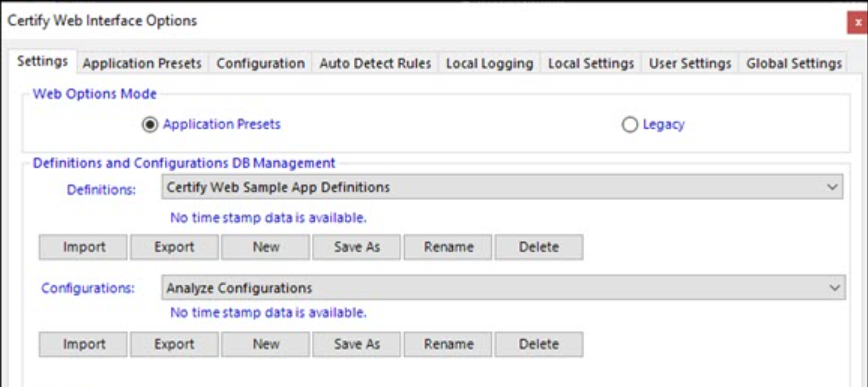
In the Certify settings (Configure->Web-> Options->Settings tab), select “Application Presets” in the Web Options Mode section. Next in the Application Presets tab, set “Self Healing Enabled” as “True” and “Confidence Threshold”.
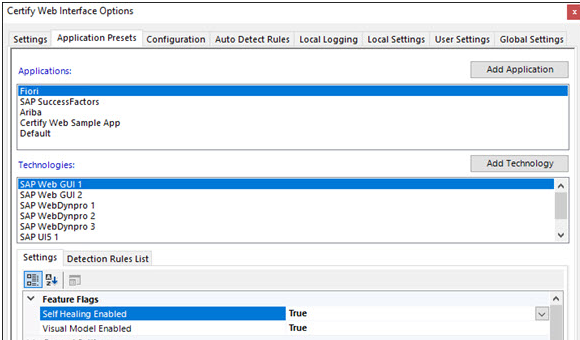
Self Healing Data Collection allows Certify to collect additional information about application objects. This information can later be used when Certify is not able to find the object using its original identification.
Confidence Threshold is a setting which Certify uses to decide how sure the system needs to be before it uses self-healing. It’s a number between 0 and 1, where 1 is 100%. When Certify tries to fix an object it can’t find, it calculates a confidence score. If that score is higher than the threshold, it goes ahead with self-healing. If it’s lower, it stops to avoid mistakes. By default, the threshold is set to 0.7, so Certify must be at least 70% confident before applying self-healing.

Based on the above configurations, Certify uses the additional information stored and recognises the object if the confidence is more than the threshold (70%).
Under the settings tab, if “Legacy” radio button is selected as the Web Options Mode, the “Worksoft.Interfaces.HTML.dll.config” file should be configured to enable the Self-Healing functionality.
Self-Healing in Tricentis Tosca
Tricentis Tosca follows a slightly different approach.
Tosca uses self-healing properties of application controls. These properties are captured when the application is scanned using Tosca XScan. If Tosca cannot find the original control during execution, it uses these properties to look for another control that is a good match.
Let us consider the same example where the properties of the search button are changed. In this case, Tosca will use below configurations to identify the object.
In the Test case section, add “Self Healing” Test configuration parameter and select either “Weighted” or “Combination” options, set “SelfHealingWeightThreshold”.
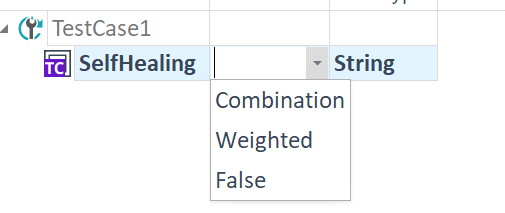

Weighted compares the properties of the missing control with available controls and assigns scores based on how closely they match. Tosca selects the control with the highest overall score which is at least greater than or equal to the default value (0.75). In simple terms, it is a scoring-based approach.
Combination tries different combinations of self-healing properties to find the most suitable matching control. In simple terms, it checks different property combinations until it finds a suitable alternative.
Based on the above configurations, Tosca uses the additional information stored. Using either weighted or combination approach, it recognises the object if the confidence is more than the threshold (75%).
Effectiveness in Web Applications
Self-healing can be helpful in Web applications where a few object properties change frequently. However, its effectiveness depends on the type of change. Self-healing can help automation scripts continue working only when there are small changes in application objects. For example, if the “Search” button is renamed to say “Find” or its properties change slightly, i.e., the control is of the same type, self-healing may be able to identify the updated object. If the control itself changes significantly, such as an EditBox being replaced by a Dropdown, manual updates to the control may still be required.
Objects that were already learnt in older versions, i.e., before self-healing was enabled, will not have self-healing data. Therefore, self-healing will not work for those existing objects. Only newly learnt objects will include self-healing data.
Use Cases and Business Benefits
Self-healing can be useful in several areas:
Where Self-Healing Helps
- SAP Fiori upgrades: Helps automation handle changes in Fiori controls.
- Regression testing: Reduces failures caused by small technical UI changes.
- Dynamic web applications: Helps when IDs and other object properties change.
- Large automation suites: Reduces the effort needed to maintain a large number of tests.
Business Benefits
- Reduced script maintenance: Less manual effort is required when application objects change.
- Lower maintenance cost: Reduced rework can save time, cost and effort for the team.
Can Self-Healing Fix Every Failure?
No. Self-healing does not replace testers or fix every automation failure. However, when used in the right situations, it can reduce unnecessary maintenance and make automation more stable. This allows testing teams to spend less time fixing automation scripts and more time focusing on testing the application.
Self-healing is helpful, but it is not a solution for every type of change. It should be looked at as a way to reduce maintenance effort, rather than completely remove the need for maintenance.
Conclusion
Both Worksoft Certify and Tosca are solving the same basic problem: helping automation continue even when a few of the objects/controls change and thereby reducing maintenance effort. The key difference lies in the approach made to achieve self-healing.
The idea behind both is quite simple: if the application has minor technical changes, and the business process is still the same, the automation should have a chance to continue.